Introduction: More Than Just an Action Camera
In the past, “action cameras” were mostly for extreme sports like skydiving or surfing. They were built to survive crashes, not necessarily to make “pretty” videos. But things have changed. Today, most people use these small, tough cameras for vlogging, travel, and sharing their daily lives on TikTok or YouTube.
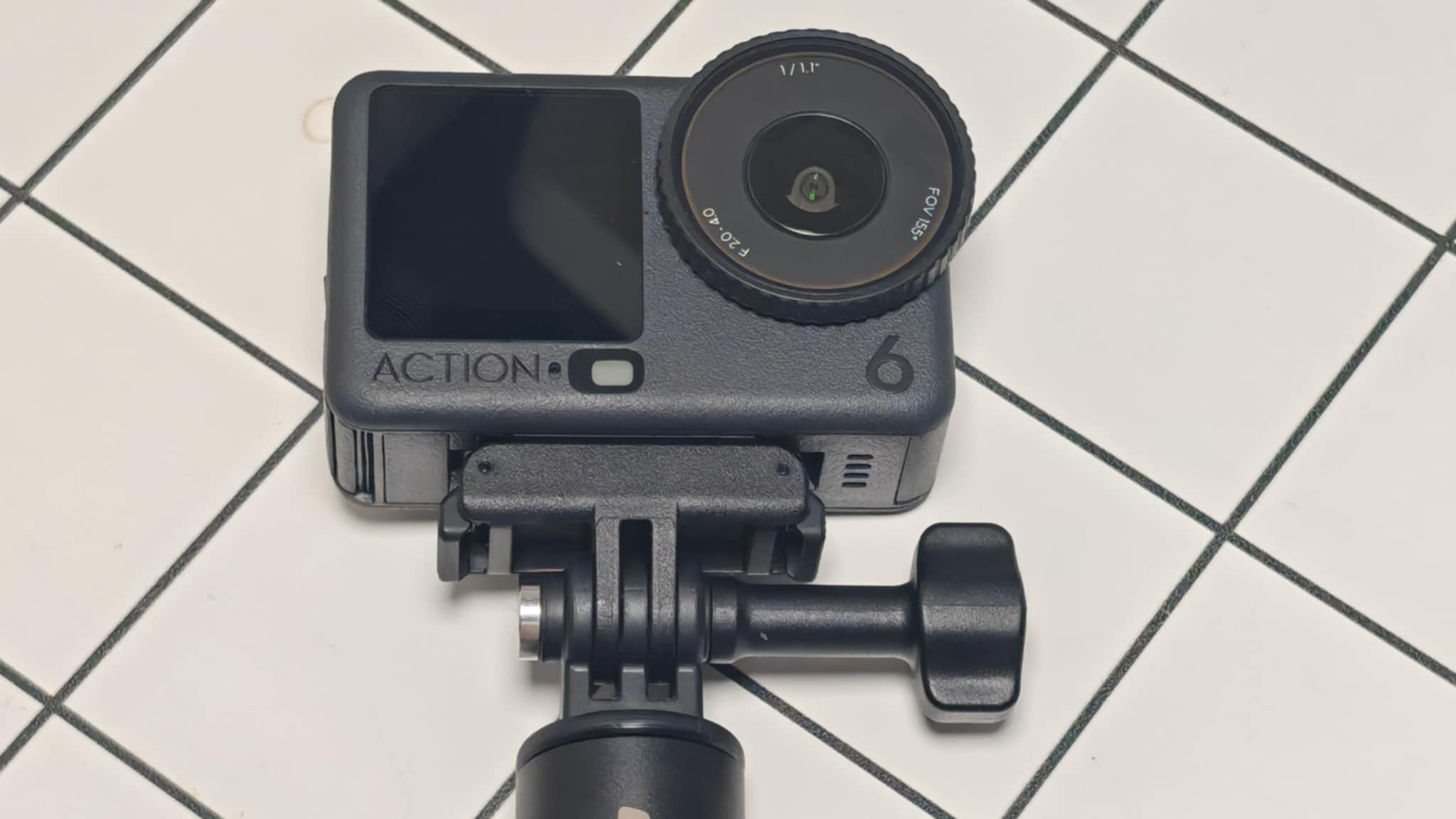
The DJI Osmo Action 6 is the perfect example of this change. It is still tough and waterproof, but it is designed for creators, not just daredevils. It has a massive new sensor (the part that captures light), a lens that can change how much light it lets in (variable aperture), and special features to make your skin look good. This review will explain why the Action 6 might be the best camera for your vlogging channel, explained in simple terms.
The Big Change: A Better Camera Lens and Sensor
To understand why this camera is special, we need to look at how it captures images. Most action cameras struggle in low light (like at night) because their sensors are small. The Action 6 fixes this.
1. The 1/1.1-Inch Sensor
The “sensor” is the heart of the camera. It catches the light to make the video. The Action 6 has a sensor that is much larger than the ones in most other action cameras and phones.
- The Bucket Analogy: Imagine pixels are like buckets catching rain. A bigger bucket catches more rain (light) faster. Because the Action 6 has “bigger buckets” (pixels), it captures cleaner, brighter video even when it is dark, like at a night market.
2. The Square Sensor: Shoot Once, Post Everywhere
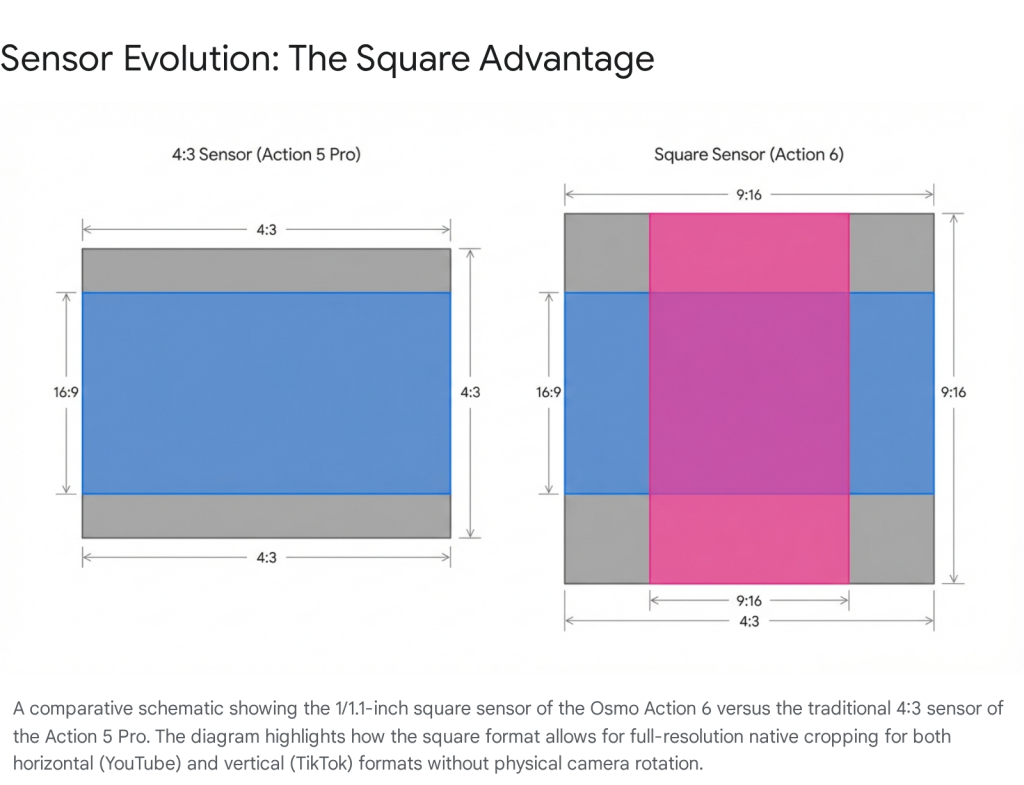
Most cameras have a rectangular sensor (shaped like a TV screen). The Action 6 has a square sensor. This is a huge deal for content creators.
- Why it matters: You can shoot a video in “4K Custom” mode, and the camera records a large square video. Later, you can crop out a horizontal video for YouTube AND a vertical video for TikTok from the exact same clip. You don’t need to rotate the camera or choose which platform to shoot for. You get high quality for both.
3. Variable Aperture: Controlling the Light
This is one of the coolest features. The “aperture” is the hole in the lens that lets light in, just like the pupil in your eye.
- Old Problem: Most action cameras have a fixed hole size. If it’s too bright, the video can look jittery. If it’s too dark, the video looks grainy.
- The Action 6 Solution: This camera can physically open and close that hole (from f/2.0 to f/4.0).
- In Dark Places: It opens wide (f/2.0) to let in lots of light, making your night videos look bright and clean.
- In Bright Sun: It closes down (f/4.0) to make the video look smoother and more natural.
Visual Performance: The Lifestyle Look
For a tech review on Wazzup.ph, image quality is key. The Action 6 moves away from the harsh, sharp look of old action cams to a softer, more “cinema-like” look.
1. Skin Tones and Colors
Vloggers need to look good on camera. The Action 6 has a special sensor that reads the color of the light around you. This makes sure your skin looks natural, not orange or grey, whether you are inside a cafe or outside in the sun.
2. Low Light: The “SuperNight” Mode
This is where the Action 6 beats the competition. If you are vlogging a night out in Manila, you can use “SuperNight” mode. It uses AI to remove the graininess (noise) from the video. The result is clear, colorful footage that looks like it was shot on a much bigger, more expensive camera.5
3. No More “Fish-Eye” Look
Wide-angle lenses are great for fitting everything in the frame, but they can make your face look distorted (like a bubble). DJI has a mode called “Natural Wide.” It keeps the background wide but fixes the middle of the picture so your face looks normal. This makes your vlogs look much more professional.
Audio: Great Sound Without Extra Gear
Good video needs good audio. If people can’t hear you, they won’t watch.
1. Built-in Microphones
The camera has three microphones that are good at cancelling out wind noise. This is perfect for when you are walking and talking outside.
2. Wireless Freedom with DJI Mic 2
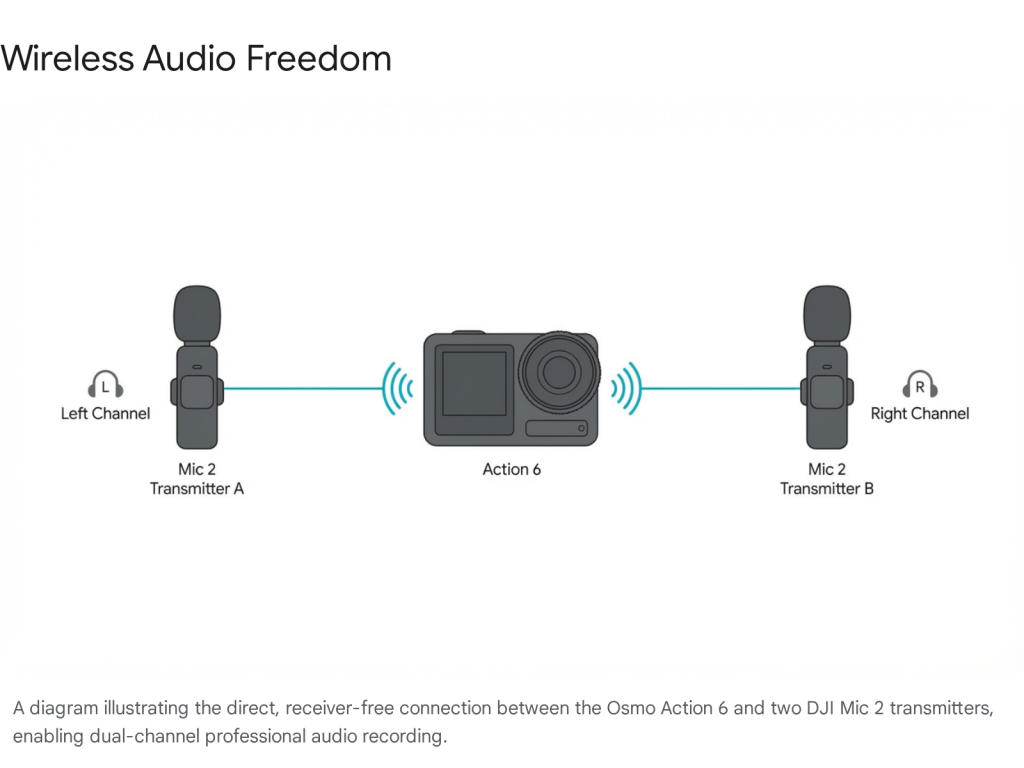
This is a favorite feature for many creators. You can connect two DJI Mic 2 wireless microphones directly to the camera via Bluetooth.
- No Receiver Needed: You don’t need to plug anything into the camera. Just clip the mic to your shirt, and it connects automatically. This is amazing for interviews or if you are in a noisy place and need your voice to be crystal clear.
Stabilization: Smooth Video Every Time
“Stabilization” is what keeps the video steady even if your hands are shaking.
- RockSteady: This mode makes your walking shots look like you are using a tripod.
- HorizonSteady: This keeps the horizon level. Even if you tilt the camera left or right while holding it, the video stays perfectly flat. This is great for “walk and talk” vlogging because you don’t have to worry about holding the camera perfectly straight.
User Experience: Easy to Use
1. Two Screens
There is a touchscreen on the back and another one on the front. The front screen is super bright (OLED), so you can see yourself clearly even in bright sunlight. This is essential for framing your vlog shots.
2. Battery Life and Storage
- Long Battery: You can record for over 2 hours in 4K resolution. If the battery runs low, it has fast charging—you can get 80% battery in just 22 minutes.
- Built-in Memory: It has 50GB of storage built inside. If you forget your SD card at home, you can still record for about 2 hours. This is a lifesaver!
Usage Scenarios: How to Use It
Scenario 1: The Travel Vlogger
- Situation: You are exploring a beautiful beach or temple.
- Setup: Use HorizonSteady to keep the shot smooth while you walk. Shoot in 4K Custom (Square) mode so you can post the video to both YouTube and Instagram Stories later.
- Result: One camera captures everything you need for all your social media channels.
Scenario 2: The Night Market Food Review
- Situation: You are eating street food at night. It’s dark and loud.
- Setup: Turn on SuperNight Mode to make the video bright. Clip on a DJI Mic 2 or DJI Mic Mini so your voice is clear over the crowd noise. Use the Macro Lens (an extra accessory) to get a close-up shot of the food that looks blurry in the background.
- Result: A professional-looking food review that looks like it was shot with a big camera.
Who is This Camera Ideal For?
- Solo Creators: If you film yourself and need a lightweight setup that does everything (video, audio, stabilization).
- TikTok & YouTube Creators: If you post to both platforms, the square sensor will save you so much editing time.
- Travelers: It’s small, waterproof, and has a long battery life.
- Night Vloggers: The low-light performance is the best you can get in a camera this size.
Pros and Cons
Pros (The Good Stuff)
- Square Sensor: Shoot vertical and horizontal video at the same time.
- Great in Low Light: The variable aperture (f/2.0) and big sensor make night videos look amazing.
- Wireless Audio: Connects directly to DJI Mic 2 without extra dongles.
- Internal Storage: 50GB built-in means you never miss a shot if your card is full.
- Fast Charging: Get back to filming quickly.
- Natural Colors: Skin tones look great straight out of the camera.
Cons (The Not-So-Good Stuff)
- Price: It is a premium camera. In the Philippines, the Standard Combo is around ₱24,390 and the Adventure Combo is ₱29,990.
- Fixed Focus: Unlike a smartphone, you can’t tap to focus on close objects unless you buy the extra Macro Lens.
- Lens Flare: Sometimes bright lights can cause glare on the lens.
Conclusion
The DJI Osmo Action 6 is more than just a tough camera for sports. It is a powerful tool for storytelling. By fixing common problems like bad night video and tricky audio, it makes vlogging easier and higher quality. For creators in the Philippines who want to upgrade their content without carrying a heavy bag of gear, this is the camera to get.